Paid advertising is one of the best ways to bring in new customers, get leads, and increase brand awareness. It can give fast results (compared to unpaid advertising), fit any budget, and is easy to measure.
If you don’t know how to generate leads using paid ads, then this guide is for you. Read on for detailed info on how to set up your Facebook Ads Account, how to launch your first campaign, and what to do once it’s running.
Why Facebook? Simple: 2 billion monthly active users, easy to set up, and lots of tools to help you reach the right audience.
Set up the account
Below are the steps you need to take before launching an ad. The time required – approximately 1-1.5 hours.
- Create an account in Facebook Business Manager, add your team there if needed, and add a payment method. Here is a detailed guide that covers these 3 key things. You need a Business Account to manage all the information about your business, including your marketing.
- Add an Ad Account to the Business Manager. Here is the guide. You need an Ad Account to create and manage your campaigns and check the results.
- Add a Facebook Pixel to your website. FB Pixel is a piece of code that helps measure ad campaign results (website traffic and conversions) and create audiences of those who visited your website (retargeting). Here is the guide.
Create a campaign
The boring part is over 😅, let’s continue with setting up your first campaign. The time required – approximately 1 hour.
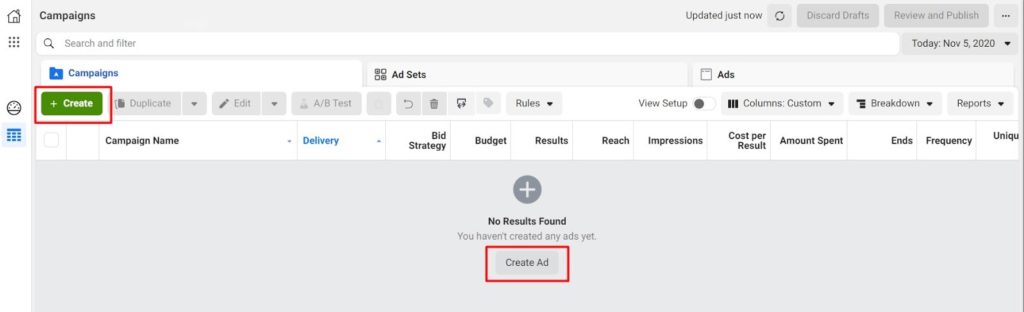
Log into the Ads Manager, go to the campaign dashboard, and find the green ‘Create’ button on the dashboard.
For your first campaign, we suggest using the following setup parameters and assets that we’ve already tested. Here is a step by step description of which options to choose:
- Create Campaign (objective, budget)
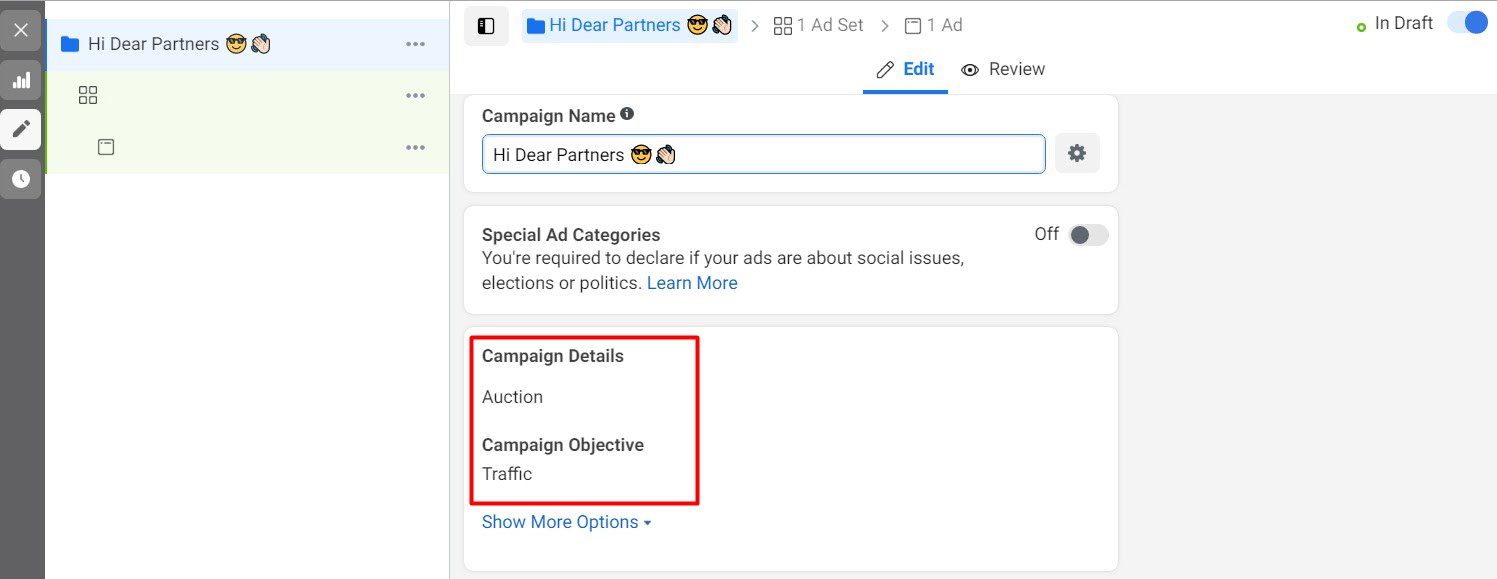
- Buying type – Auction

- Campaign Objective – Traffic
- > Next
- Campaign budget optimization – On. Then choose your daily budget (can try to start with $25-30/day)
- > Next
- Add Ad Set details (audience, placements, optimization)
- Traffic – Website
- Dynamic Creative – On
- Audience Location > People living in this location + Choose your country
- Age – 23-64
- Detailed Targeting > Edit > People Who Match (copy and paste one by one the points below): Consumer Electronics Show, Holography, TechRadar, LED display, Immersion (virtual reality), Disruptive innovation, TechCrunch, Technology early adopters
- Detailed Targeting Expansion – On (only if your audience is less than 300k people – audience size is shown in the special field on the right)
- Placements > Manual. Delete (deselect) “Audience Network” from placements.
- Optimization for Ad Delivery > Landing Page Views
- > Next
- Create Ad (videos, text, link)
- Identity > Choose your Facebook business page + your Instagram page (click “Connect account” for that)
- Ad Setup > Single Image/Video
- Ad Creative > Select Videos > Upload. We suggest using several HypervsnLab videos – here are the files.
- Optimize Creative For Each Person – On
- Primary Text > Translate and add the following 4 options (or similar of your choice):
- This holographic technology is the next retail trend. Be the first to learn more about it 😉
- Have you seen this? This holographic technology is trending right now! 🤩
- We bet you’ve never seen a technology like this before! Introducing the world’s first 3D holographic display system.
- We can guarantee 3 things: you’ll be amazed, entertained and excited by the new opportunities our technology can bring you 😀
- Headline
- New generation 3D display
- All-in-one holographic solution
- Description
- A new era of advertising & brand communication.
- Website URL > Add URL (don’t forget UTM parameters for tracking)
- Tracking > Conversion Tracking > Fb Pixel – On
- > Publish
Congrats! 🎉 Your ad has been launched! It will go live once it has been approved by Facebook.
What to do next
- Monitor campaign performance and main parameters (cost of website visits, number of leads, click-through-rate). For example, the cost of the landing page visits should be lower than $2, in the best case – less than $0.50. Feel free to make changes in audiences, text, videos if you don’t have any website visitors. Make sure to give Facebook algorithms at least a week before changing everything completely.
- Monitor incoming leads and reply fast. Potential customers may contact you in comments, via direct messages on Facebook or on your website. Check all the channels several times a day, and give more information about the product to those who are interested.
- Launch Remarketing campaign. Re-engage with those who visited your website and make them an offer. Campaigns with at least 2-steps proved to have a way better conversion rate for us. Learn more about retargeting.
Have more questions on your first campaign launch? Comment below or post in the LinkedIn Group and we’ll get back to you. Stay tuned for the second part with more tips on audiences, creatives, and campaign types!